
Switching To Typescript in your React Apps
Once you go Typescript, you don’t go back - A couple of Pretty Smart People I know.
These days more developers seem to be making the switch to Typescript. It is rightly so because typescript is a statically typed superset of Javascript that compiles to Javascript. It means that it contains all the features and functionality of JavaScript and more that help us build faster and more robust react apps.
The extra features of typescript include:
- Strongly-typed arrays and Strongly-typed tuples
- Type annotations: It allows us to assign types to variables.
- The never type: It is used to represent a type of value that will never occur.
- The unknown type: It allows us to reduce the use of
anyand create more strongly-typed code. - Intersection types: It allows us to combine existing types to form a new type with all the members from the type it is based on
- Union types: It allows us to combine a new form of type using the pipe
|character
Although Typescript helps reduce the chances of bugs, makes refactoring easier, improves the use of Javascript, self-documents code and helps with readability, the typing system is said to be complicated.
Setting Up TypeScript + React
A react project with Typescript can be created either manually or using the Create React App. Create React App is a CLI tool that saves one from time-consuming setup and configuration of React Apps. In this piece, I’ll be using Create React App(CRA).
Prerequisites
- Npm and Node > 5.2 installed.
- Create React App (CRA) > 2.1 installed.
- Basic Knowledge of React.
Setting Up
To start a new Create React App project with TypeScript we need to run
1npx create-react-app supercharged-javascript --template typescript2 # or3yarn create react-app supercharged-javascript --template typescript4
The “--template typescript” flag is added to generate a typescript template. A Typescript project called supercharged-javascript is created. You can name your project whatsoever you choose.
1 cd supercharged-javascript2 code .3
You’ll notice that there are a couple of differences in the generated project template when compared to the regular react app template
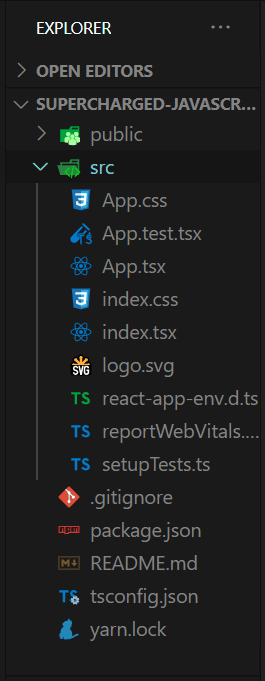
- .tsx file - File extensions that were previously .js/jsx are now .tsx, tsx stands for TypeScript JSX.
- A tsconfig.json file - According to the Typescript Documentation- “The tsconfig.json file specifies the root files and the compiler options required to compile the project”. It contains all Typescript configurations.
- A react-app-env.ts - This file contains typescripts types definition and allows support for importing resources like bmp, gif, jpeg, jpg, png, webp, svg and CSS Modules.
Apart from these few, every other thing is pretty much the same. We also get the extra features Create React App comes saddled with like linting, hot reload and the likes.
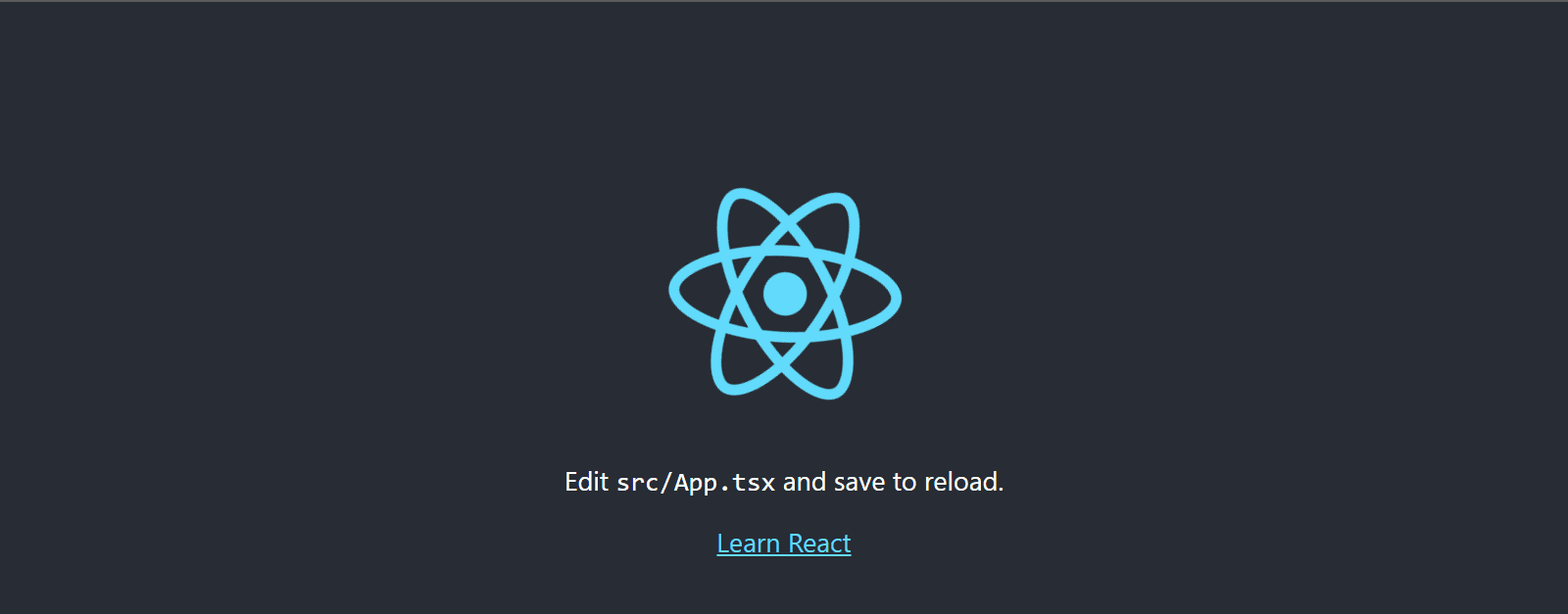
Starting Our App
Creating Our Feedback Form
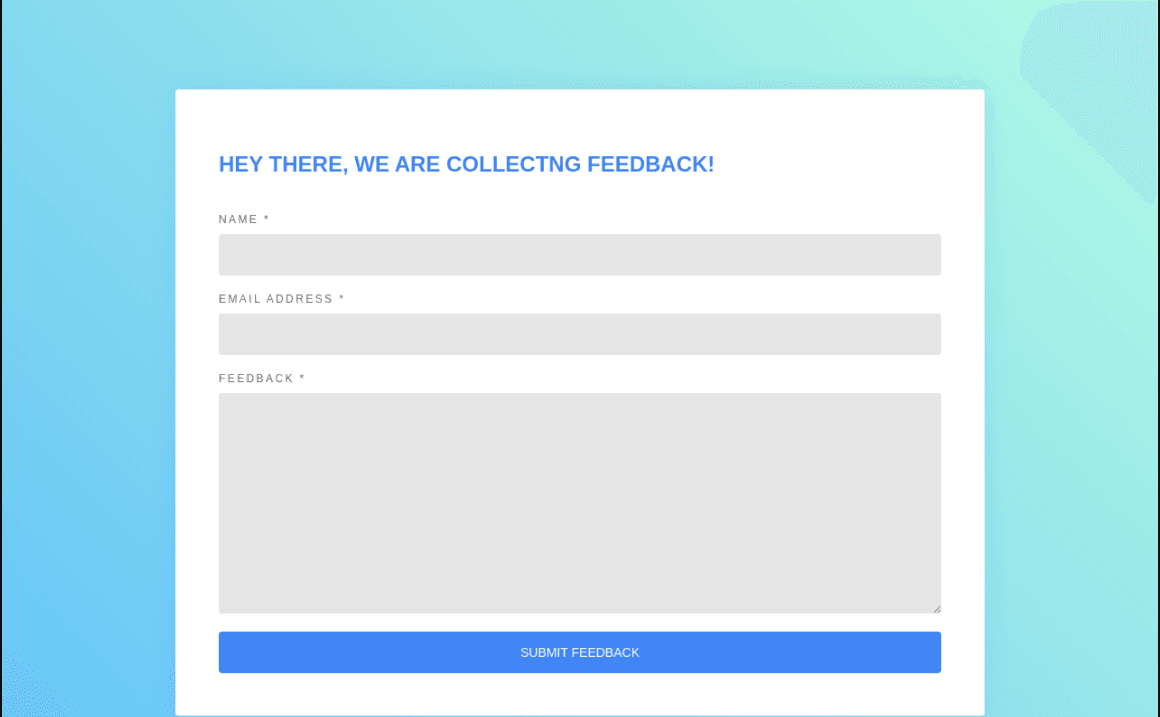
We will start by creating a Form.tsx file for our Form component in the src folder and add the code below which gives us a starting point for our form. In our Form.tsx we'll have:
1import React from "react";23const Feedback= ({ userCredentials }) => {4 const { displayName } = userCredentials;5 return (6 <article >7 <div className="form-header">8 <h1>Thanks for filling the form {displayName}, We've received Your Feedback!</h1>9 </div>10 </article>11 )12}1314const Form = () => {15 const [userCredentials, setCredentials] = useState({16 displayName: "",17 email: "",18 message: "",19 });20 const [showFeedback, setFeedback] = useState({21 showFeedbackComponent: false22 });23 const { email, displayName, message } = userCredentials;24 const { showFeedbackComponent } = showFeedback;25 const handleSubmit = (event) => {26 event.preventDefault();27 if (email && displayName && message) {28 setFeedback({ showFeedbackComponent: true })29 }30 };31 const handleChange = (event) => {32 const { value, name } = event.target;33 setCredentials({ ...userCredentials, [name]: value });34 };35 return (36 <div className="form">37 {38 showFeedbackComponent ?39 <Feedback40 userCredentials={userCredentials}41 /> :42 <section >43 <div className="form-header">44 <h1>Hey There, We Are Collectng Feedback!</h1>45 </div>46 <div className="form-content">47 <form onSubmit={handleSubmit}>48 <div className="form-group">49 <label htmlFor="displayName">Name *</label>50 <input51 required52 type="text"53 name="displayName"54 value={displayName}55 onChange={handleChange}56 />57 </div>58 <div className="form-group">59 <label htmlFor="email">Email Address *</label>60 <input61 required62 type="email"63 name="email"64 value={email}65 onChange={handleChange}66 />67 </div>68 <div className="form-group">69 <label htmlFor="message">Feedback *</label>70 <textarea71 name="message"72 className="form-input"73 value={message}74 onChange={handleChange}75 required76 rows={10}77 />78 </div>79 <div className="form-group">80 <button type="submit"81 >Submit Feedback</button>82 </div>83 </form>84 </div>85 </section >86 }87 </div>88 )89}90export default Form;91
This is a React feedback form without any Typescript functionality. Let's add our styles to our App.css file
1html {2 width: 100%;3 height: 100%;4}5body {6 background: linear-gradient(45deg, rgba(66, 183, 245, 0.8) 0%, rgba(66, 245, 189, 0.4) 100%);7 color: rgba(0, 0, 0, 0.6);8 font-family: "Roboto", sans-serif;9 font-size: 14px;10 line-height: 1.6em;11 -webkit-font-smoothing: antialiased;12 -moz-osx-font-smoothing: grayscale;13}1415.form {16 padding: 3rem;17 z-index: 15;18 position: relative;19 background: #FFFFFF;20 width: 70%;21 border-radius: 4px;22 box-shadow: 0 0 30px rgba(0, 0, 0, 0.1);23 box-sizing: border-box;24 margin: 100px auto 10px;25 overflow: hidden;26}272829.form-group {30 display: -webkit-box;31 display: flex;32 flex-wrap: wrap;33 -webkit-box-pack: justify;34 justify-content: space-between;35 margin: 0 0 20px;36}37.form-group:last-child {38 margin: 0;39}40.form-group label {41 display: block;42 margin: 0 0 10px;43 color: rgba(0, 0, 0, 0.6);44 font-size: 12px;45 font-weight: 500;46 line-height: 1;47 text-transform: uppercase;48 letter-spacing: .2em;49}5051.form-group input {52 outline: none;53 display: block;54 background: rgba(0, 0, 0, 0.1);55 width: 100%;56 border: 0;57 border-radius: 4px;58 box-sizing: border-box;59 padding: 12px 20px;60 color: rgba(0, 0, 0, 0.6);61 font-family: inherit;62 font-size: inherit;63 font-weight: 500;64 line-height: inherit;65 -webkit-transition: 0.3s ease;66 transition: 0.3s ease;67}68.form-group textarea {69 outline: none;70 display: block;71 background: rgba(0, 0, 0, 0.1);72 width: 100%;73 border: 0;74 border-radius: 4px;75 box-sizing: border-box;76 padding: 12px 20px;77 color: rgba(0, 0, 0, 0.6);78 font-family: inherit;79 font-size: inherit;80 font-weight: 500;81 line-height: inherit;82 -webkit-transition: 0.3s ease;83 transition: 0.3s ease;84}85.form-group input:focus {86 color: rgba(0, 0, 0, 0.8);87}8889.form-group button {90 outline: none;91 background: #4285F4;92 width: 100%;93 border: 0;94 border-radius: 4px;95 padding: 12px 20px;96 color: #FFFFFF;97 font-family: inherit;98 font-size: inherit;99 font-weight: 500;100 line-height: inherit;101 text-transform: uppercase;102 cursor: pointer;103}104105.form-header {106 margin: 0 0 40px;107}108.form-header h1 {109 padding: 4px 0;110 color: #4285F4;111 font-size: 24px;112 font-weight: 700;113 text-transform: uppercase;114}115
Let's import our Form.tsx into our App.tsx:
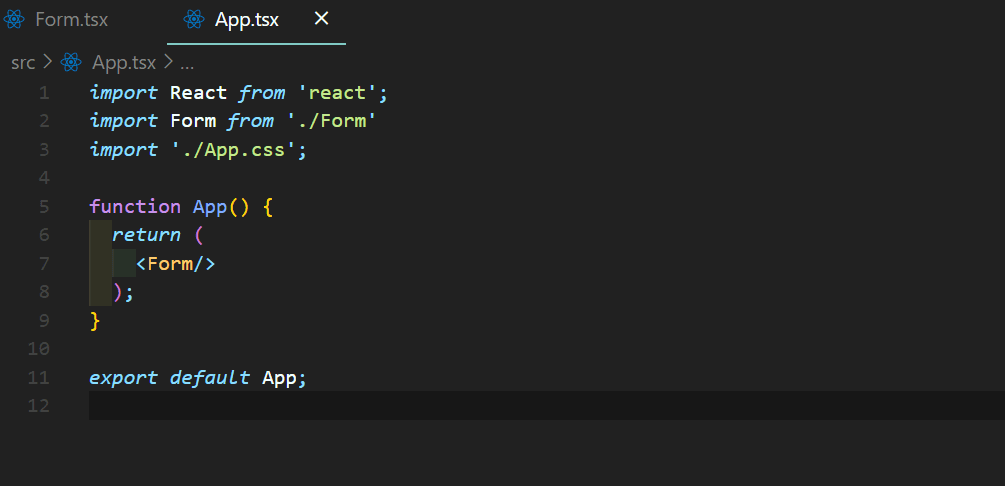
We should get a ton load of errors.
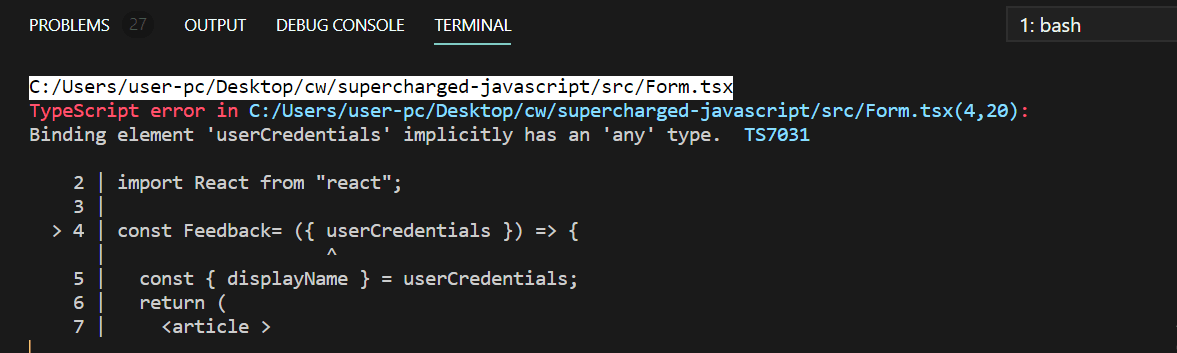
To fix them we have to understand types and interfaces.
Types and Interfaces
Types
Typescript deals with types, when we declare variables we can specify their types. Javascript is known to have eight types: string, number, null, undefined, object, symbol, bigint, and boolean. However because Javascript is dynamically typed, it will not know the type of your variable until runtime and errors and bugs often come up. Typescript adds static types to the code and this helps in fixing the problem.
We declare variables with types this way :
1let variableName: typeScriptType = value;2//string3let fullName: string = 'Bami Ogunfemi'4//boolean5let done: boolean = true;6//number7let age: number = 19;8
Interfaces
Interfaces in TypeScript are used when we need to give types to objects properties. Interfaces are used to declare our types We declare interfaces this way:
1interface objName{2key1: typeScriptType,3key2 typeScriptType,4}56//person interface object7interface person{8name: string,9age: number,10happy: boolean11}12
Types & Interfaces vs Prop Types Prop types are used in Javascript for type checking. To run type checking on the props for a component, you can assign the special propTypes property. As of React v15.5, React.PropTypes has moved into a different package.
Let's Create an Interface describing our data
1interface userPropsType {2 displayName: string,3 email: string,4 message: string,5}6interface formProps{7 userCredentials: userPropsType,8}9
Now let’s extend our app to use the interface we just created. Now our feedback component has access to our props.
1import React, { useState, FC , ChangeEvent, FormEvent} from "react";23interface userPropsType {4 displayName: string,5 email: string,6 message: string,7}8interface formProps{9 userCredentials: userPropsType,10}11const Feedback: FC<formProps> = ({ userCredentials }) => {12 const { displayName } = userCredentials;13 return (14 <article >15 <div className="form-header">16 <h1>Thanks for filling the form {displayName}, We've received Your Feedback!</h1>17 </div>18 </article>19 )20}2122const Form = () => {23 const [userCredentials, setCredentials] = useState({24 displayName: "",25 email: "",26 message: "",27 });28 const [showFeedback, setFeedback] = useState({29 showFeedbackComponent: false30 });31 const { email, displayName, message } = userCredentials;32 const { showFeedbackComponent } = showFeedback;33 const handleSubmit = (event) => {34 event.preventDefault();35 if (email && displayName && message) {36 setFeedback({ showFeedbackComponent: true })37 }38 };39 const handleChange = (event) => {40 const { value, name } = event.target;41 setCredentials({ ...userCredentials, [name]: value });42 };43 return (44 <div className="form">45 {46 showFeedbackComponent ?47 <Feedback48 userCredentials={userCredentials}49 /> :50 <section >51 <div className="form-header">52 <h1>Hey There, We Are Collectng Feedback!</h1>53 </div>54 <div className="form-content">55 <form onSubmit={handleSubmit}>56 <div className="form-group">57 <label htmlFor="displayName">Name *</label>58 <input59 required60 type="text"61 name="displayName"62 value={displayName}63 onChange={handleChange}64 />65 </div>66 <div className="form-group">67 <label htmlFor="email">Email Address *</label>68 <input69 required70 type="email"71 name="email"72 value={email}73 onChange={handleChange}74 />75 </div>76 <div className="form-group">77 <label htmlFor="message">Feedback *</label>78 <textarea79 name="message"80 className="form-input"81 value={message}82 onChange={handleChange}83 required84 rows={10}85 />86 </div>87 <div className="form-group">88 <button type="submit"89 >Submit Feedback</button>90 </div>91 </form>92 </div>93 </section >94 }95 </div>96 )97}98export default Form;99
We are now using the interface in our application. Next, we have to add the form event function. For handleSubmit, we will use the FormEvent with the type of HTMLFormElement.
12const handleSubmit = (event:React.FormEvent<HTMLFormElement>) => {3 event.preventDefault();4 if (email && displayName && message) {5 setFeedback({ showFeedbackComponent: true })6 }7 };8
Now the handleSubmit expects an event of FormEvent and type of Form Element. The handleChange will take an event of HandleChange and expect type of HTMLInputElement for input and HTMLTextAreaElement for textarea.
1 const handleChange = (event: React.ChangeEvent<HTMLInputElement> |React.ChangeEvent<HTMLTextAreaElement>) => {2 const { value, name } = event.target;3 setCredentials({ ...userCredentials, [name]: value });4 };5
Our Form.tsx file should look like this now :
12import React, { useState, FC, ChangeEvent ,FormEvent } from "react";3interface userPropsType {4 displayName: string,5 email: string,6 message: string,7}8interface formProps{9 userCredentials: userPropsType,10}11const Feedback: FC<formProps> = ({ userCredentials }) => {12 const { displayName } = userCredentials;13 return (14 <article >15 <div className="form-header">16 <h1>Thanks for filling the form {displayName}, We've received Your Feedback!</h1>17 </div>18 </article>19 )20}2122const Form = () => {23 const [userCredentials, setCredentials] = useState({24 displayName: "",25 email: "",26 message: "",27 });28 const [showFeedback, setFeedback] = useState({29 showFeedbackComponent: false30 });31 const { email, displayName, message } = userCredentials;32 const { showFeedbackComponent } = showFeedback;33 const handleSubmit = (event: FormEvent<HTMLFormElement>) => {34 event.preventDefault();35 if (email && displayName && message) {36 setFeedback({ showFeedbackComponent: true })37 }38 };39 const handleChange = (event: ChangeEvent<HTMLInputElement> |ChangeEvent<HTMLTextAreaElement>) => {40 const { value, name } = event.target;41 setCredentials({ ...userCredentials, [name]: value });42 };43 return (44 <div className="form">45 {46 showFeedbackComponent ?47 <Feedback48 userCredentials={userCredentials}49 /> :50 <section >51 <div className="form-header">52 <h1>Hey There, We Are Collectng Feedback!</h1>53 </div>54 <div className="form-content">55 <form onSubmit={handleSubmit}>56 <div className="form-group">57 <label htmlFor="displayName">Name *</label>58 <input59 required60 type="text"61 name="displayName"62 value={displayName}63 onChange={handleChange}64 />65 </div>66 <div className="form-group">67 <label htmlFor="email">Email Address *</label>68 <input69 required70 type="email"71 name="email"72 value={email}73 onChange={handleChange}74 />75 </div>76 <div className="form-group">77 <label htmlFor="message">Feedback *</label>78 <textarea79 name="message"80 className="form-input"81 value={message}82 onChange={handleChange}83 required84 rows={10}85 />86 </div>87 <div className="form-group">88 <button type="submit"89 >Submit Feedback</button>90 </div>91 </form>92 </div>93 </section >94 }95 </div>96 )97}98export default Form;99
Conclusion
In this article, we’ve covered setting up TypeScript in a React project, and why we might want to start using Typescript in our react apps. We’ve also built a feedback form with TypeScript and React to see how TypeScript is used in React projects. The supporting repository for this article is available on GitHub .